Your Journey to Dynamics 365 Starts Here!
Fill in your business details and let
us be your partner in growth.
 New York, United States
The company is a New York–based interior design studio. It works in a domain where ideas are not just imagined but also brought to life through thoughtful execution of projects. Each engagement moves through multiple design phases, which demand close coordination between clients, vendors, and internal teams.
The studio handles both residential and commercial projects, with each project bringing its own pace and expectations. Right from initial inquiries to final delivery, clear communication is paramount, as deadlines don't leave much room for delays or confusion.
As the business grew, so did the volume of client interactions. It received leads through different channels, but conversations and notes were often scattered across emails and different tools. The professionals were able to handle this situation since they had expertise, but it was hard to be consistent and operating like this, because there was not a proper CRM.
The business reached a point where important details could be missed, follow-ups relied on memory, and visibility into opportunities started remaining limited. As a result, the studio needed a system that could bring structure without interrupting its creative workflow.

The studio has been using Outlook as a simple, temporary CRM to keep track of sales and communications with clients. When operations were smaller, it worked, but as projects and inquiries grew, this setup started to fail, making it hard for teams to keep track of things, see what's going on, work together, and follow up on time.
Here is what they were dealing with:
Scattered Customer InformationCustomer details, conversations, and notes were spread across emails, personal inboxes, and individual records, making it difficult for teams to access complete and reliable information quickly when needed.
Lack of Structured Sales ProcessThere was no clearly defined process to manage leads or opportunities, which meant each team member handled things differently, leading to inconsistency and confusion across the sales cycle.
Limited Visibility into OpportunitiesIt was not easy for the team to understand which inquiries were active, which were progressing, or which had gone cold, making planning and follow-ups less effective.
Manual Tracking of InquiriesClient inquiries were handled manually through emails and notes, which was not only time consuming but also increased the chances of missed follow-ups, delayed responses, and inconsistent tracking of important communication.
No Central Case ManagementThere was no dedicated system in place to manage incoming client queries, assign responsibility, or track their resolution from start to finish in a structured manner.
Disconnected ToolsOutlook operated largely on its own without meaningful integration with other systems, forcing teams to switch between tools and manually share or update important information, which consumed a lot of time.
Data Silos Across PlatformsCustomer data also existed in separate project management tools, creating silos that led to duplication, incomplete records, and difficulty in maintaining a single, accurate source of truth.
The studio wanted a solution that would bring structure without making their processes complicated. It had to fit into their way of working, not force a rigid process.
They defined their expectations clearly:
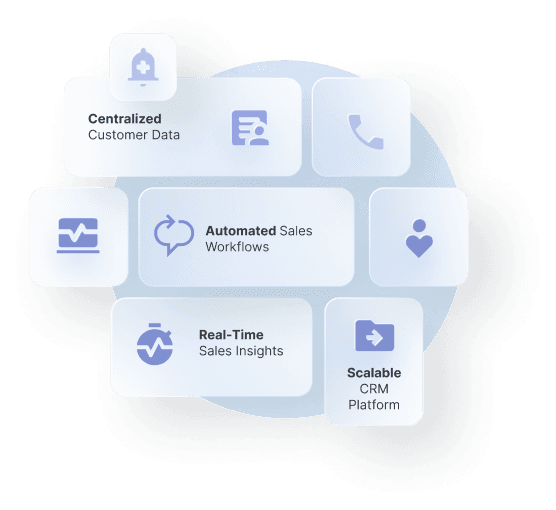
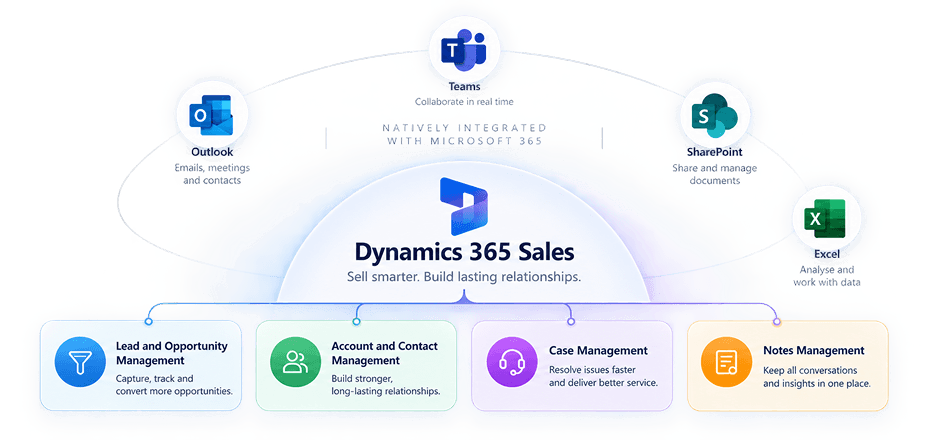
Centralized Client DataThey needed a unified place to manage accounts, contacts, and ongoing conversations without switching between tools.
Structured Lead and Opportunity TrackingThey required a clear way to manage inquiries from the first interaction to project confirmation.
Case Management for InquiriesThey required a system to track, assign, and resolve client queries efficiently.
Seamless Outlook and M365 IntegrationThey wanted the ability to work within familiar tools while keeping data connected.
Reliable Data MigrationAll existing customer data needed to be moved without loss or disruption.
Scalable CRM PlatformThey needed a system that could grow alongside the business and support future needs.
The goal was practical and grounded in day-to-day needs. The business wanted us to replace the existing setup with a more reliable system that could improve consistency, visibility, and coordination, without adding complexity or making routine tasks harder for the team.
Standardize Client HandlingIntroduce a consistent and structured approach to manage leads, opportunities, and client inquiries, ensuring uniformity across the team and reducing confusion in daily operations.
Reduce Dependency on Emails for TrackingMove away from scattered, email-based communication toward a centralized system that tracks interactions, updates, and follow-ups in a more organized manner.
Ensure Data AccuracyBring all customer and sales-related information into a single system to improve accuracy, reduce duplication, and build confidence in the data used for decisions.
Enable Better CoordinationAllow teams to stay aligned through shared visibility into client interactions and project status, minimizing the need for repeated follow-ups or manual updates.
Support Everyday WorkflowsKeep the system simple, intuitive, and aligned with daily working habits so that teams can use it comfortably without feeling slowed down or overwhelmed.
Prepare for Future GrowthCreate a scalable foundation that can handle increasing project volumes, more client interactions, and evolving business needs without requiring major system changes.
Dynamics Square implemented Microsoft Dynamics 365 Sales CRM, focusing on a clean and straightforward setup that aligned with the studio’s working style.
This was a structured migration rather than a complex transformation, but it addressed key gaps in how the team managed relationships and inquiries.
A critical part of the implementation involved moving existing data into the new system without disrupting operations.
Around 6,000 account profiles were migrated.
Approximately 8,500 contacts were transferred.
Nearly 30,000 notes were moved into the CRM.
Additional lead and inquiry data from the project management system was also migrated with all relevant fields.
This ensured continuity while improving data structure and usability.
The CRM was aligned closely with Microsoft 365 tools already in use:
Outlook integration for email tracking and scheduling.
Connection with other M365 applications for collaboration.
Data alignment with existing workflows to avoid duplication.
The shift to Dynamics 365 Sales CRM brought noticeable improvements in how the studio manages its client relationships.
More Organized Client ManagementAll client information now sits in one centralized system, making it easier for teams to access, update, and manage records without switching between multiple tools.
Better Visibility into OpportunitiesThe team can clearly track which projects are active, which are progressing, and which require immediate attention, improving overall planning and decision-making.
Improved Response HandlingClient inquiries are now tracked in a structured manner, reducing delays, avoiding missed follow-ups, and ensuring timely and consistent communication with every client.
Stronger Data ReliabilityMigrated data is now clean, structured, and consistent, allowing teams to rely on the system for accurate information and better decision-making across projects.
Simplified Daily WorkThe integration with Outlook allows users to continue working within familiar tools, reducing the learning curve and making adoption smoother for the entire team.
Reduced Manual EffortTeams spend less time searching for information or updating multiple systems, allowing them to focus more on meaningful work and client interactions.
Scalability for Future ProjectsThe system is designed to handle increasing numbers of clients, projects, and workflows, supporting the studio’s growth without requiring major system changes.
Earlier, the studio relied heavily on email-based tracking and individual effort to manage client relationships. That worked for a time, but it created gaps as the business expanded.
With Dynamics 365 Sales CRM in place, things are more structured without losing flexibility.
All Client Data in One Place All client information is centralized, eliminating the need to search across tools.
Inquiries Are Properly Tracked Every client query is logged and managed, ensuring timely and consistent responses.
Better Coordination Across Teams Teams work with shared information, improving alignment and reducing confusion across functions.
Clear View of Ongoing Work Leads and opportunities are tracked clearly from initial inquiry to final conversion.
Supports Creative Work Without Interruption The system supports existing workflows without disrupting creative processes or daily work.
The move to a structured CRM system has given the studio more control over its sales and client management processes. It has reduced confusion, improved visibility, and created a stronger foundation for future growth, while allowing the team to stay focused on what they do best: design.